Translate

8/28/2014

MS14-045 오류 패치 업데이트.

MS14-045 오류 패치 업데이트.


MS14-045: Description of the security update for kernel-mode drivers: August 27, 2014

Article ID: 2993651 - View products that this article applies to.

Collapse imageOn This Page

Collapse imageINTRODUCTION

Microsoft has released security bulletin MS14-045. To learn more about this security bulletin:

How to obtain help and support for this security update

Help installing updates: Support for Microsoft Update

Security solutions for IT professionals: TechNet Security Troubleshooting and Support

Help protect your Windows-based computer Windows from viruses and malware: Virus Solution and Security Center

Local support according to your country: International Support

Collapse imageMore information

Known issues with this security update

  • Known issue 1

    After you install this security update, fonts that are installed in a location other than the default fonts directory (%windir%\fonts\) cannot be changed when they are loaded into any active session. Attempts to change, replace, or delete these fonts are blocked, and a "File in use" message is displayed.

    For more information, go to the following Microsoft webpages:
  • Known issue 2

    After you install this update, the z-order of the windows is changed. (The z-order calls the SetWindowPos function together with the HWND_TOP parameter.) Therefore, the windows of certain applications may become invisible or may be incorrectly displayed behind other windows.

    Status 
    We are currently working on a resolution for this issue.

    Notes
    This issue also occurs after you install the following updates:
    • 2965768 Stop error 0x3B when an application changes the z-order of a window in Windows 7 SP1 and Windows Server 2008 R2 SP1
    • 2970228 Update to support the new currency symbol for the Russian ruble in Windows
    • 2973201 MS14-039: Description of the security update for Windows on-screen keyboard: July 8, 2014
    • 2975719 August 2014 update rollup for Windows RT 8.1, Windows 8.1, and Windows Server 2012 R2

Collapse imageProperties

Article ID: 2993651 - Last Review: August 27, 2014 - Revision: 2.0
Applies to
  • Windows Server 2012 R2 Datacenter
  • Windows Server 2012 R2 Standard
  • Windows Server 2012 R2 Essentials
  • Windows Server 2012 R2 Foundation
  • Windows 8.1 Enterprise
  • Windows 8.1 Pro
  • Windows 8.1
  • Windows RT 8.1
  • Windows Server 2012 Datacenter
  • Windows Server 2012 Standard
  • Windows Server 2012 Essentials
  • Windows Server 2012 Foundation
  • Windows 8 Enterprise
  • Windows 8 Pro
  • Windows 8
  • Windows RT
  • Windows Server 2008 R2 Service Pack 1
  • Windows Server 2008 R2 Datacenter
  • Windows Server 2008 R2 Enterprise
  • Windows Server 2008 R2 Standard
  • Windows Server 2008 R2 Foundation
  • Windows 7 Service Pack 1
  • Windows 7 Ultimate
  • Windows 7 Enterprise
  • Windows 7 Professional
  • Windows 7 Home Premium
  • Windows 7 Home Basic
  • Windows 7 Starter
  • Windows Server 2008 Service Pack 2
  • Windows Server 2008 Datacenter
  • Windows Server 2008 Enterprise
  • Windows Server 2008 Standard
  • Windows Server 2008 Foundation
  • Windows Server 2008 for Itanium-Based Systems
  • Windows Web Server 2008 R2
  • Windows Vista Service Pack 2
  • Windows Vista Ultimate
  • Windows Vista Enterprise
  • Windows Vista Business
  • Windows Vista Home Premium
  • Windows Vista Home Basic
  • Windows Vista Starter
  • Microsoft Windows Server 2003 Service Pack 2
  • Microsoft Windows Server 2003 R2 Datacenter x64 Edition
  • Microsoft Windows Server 2003 R2 Enterprise x64 Edition
  • Microsoft Windows Server 2003 R2 Datacenter Edition (32-Bit x86)
  • Microsoft Windows Server 2003 R2 Enterprise Edition (32-Bit x86)
  • Microsoft Windows Server 2003 R2 Standard x64 Edition
  • Microsoft Windows Server 2003, Datacenter Edition for Itanium-Based Systems
  • Microsoft Windows Server 2003, Enterprise Edition for Itanium-based Systems
  • Microsoft Windows Server 2003, Web Edition
Keywords: 
atdownload kbbug kbexpertiseinter kbfix kbsecbulletin kbsecurity kbsecvulnerability kbsurveynew KB2993651

DiskFerret v.1.4.3.4

프로모션.
http://diskferret.com/RegisterDiskFerret.v1.4.3.4.WindowsDeal.php


[​IMG]
Cleanup Wizard - The cleanup wizard is an easy to use interface that guides you step by step through a series of choices to free up disk space and remove unwanted information from your system. In addition to removing files that are not needed and not used by any applications on your system the clean up wizard allows you to clean up your Internet Explorer cache, cookies, history and also your desktop run and document histories.
Tree View - Navigate to drives, network resources, and folders in a Windows Explorer like tree view.
Data Views - DiskFerret’s data views provide a consistent, easy to use collection of charts and tables to display various views of disk space usage. Views are provided for disk space per folder and file, top files, files types, duplicate files, file distribution and owner.
Size View - Display folders and files by size and quickly drill down to sub–folders utilizing the most space.
Duplicate File View - Identify duplicate files within a drive, network share, or folder. Criteria for determining duplicates can be configured to use any combination of file name, size, date and CRC-32 checksum.
Owner View - Find out which users are using the most disk space and where their files are located.
Top Files View - Quickly find the 50 largest files within a drive, network share or folder. The top files view also provides options to view the top 50 smallest, newest and oldest files.
File Type View - Analyze utilization of a drive, network share or folder by file type.
File Distribution View - Determine utilization by file size, date or attribute.
Charts and Tables - Each data view can be displayed as a pie chart, bar chart, treemap chart, ring chart or as a table.
Pie Chart - The pie chart is a circular chart divided into sectors, illustrating the relative disk space occupied by each folder.
Bar Chart - The bar chart or bar graph is a chart with rectangular bars with lengths proportional to the disk space that they represent.
Treemap Chart - The treemap chart displays file system data as a set of nested rectangles. Each folder is given a rectangle, which is then tiled with smaller rectangles representing subfolders or files.
Ring Chart - The ring chart is a circular chart, very similar to a pie chart that is divided into sections, illustrating the relative disk space occupied by each folder.
Table View - The Table View is similar to a spreadsheet. It displays multiple cells that together make up a grid consisting of columns and rows, with each cell containing various data pertaining to a folder or file.


Steganos Online Shield VPN

프로모션.
https://www.steganos.com/specials/?m=cbe&p=sos


Steganos Online Shield


Screenshot.jpg


With just one click

Surf safely, privately and ad-free

Conceal IP addresses and blocks ads
Steganos Online Shield VPN protects your IP address. This way, hackers can no longer identify you as a potential victim. Ads on websites are blocked.
Encrypts internet connection
Steganos Online Shield VPN encrypts your data traffic with the highly secure AES-256-bit method. This way, you are protected from cyber criminals in every WiFi,LAN and wireless network (3G, LTE/4G,EDGE und GPRS)
Access regionally blocked content
Choose the location of one of the secure Steganos servers and regain access to blocked content and websites. For example watch localized content on BBC iPlayer, Netflix or YouTube.

Windows XP unofficial update service pack 4 alpha

Windows XP unofficial update service pack 4 alpha 발표.

다운로드
http://www.softpedia.com/get/Others/Signatures-Updates/Windows-XP-SP4-Unofficial.shtml

주의사항
위 모든 서비스팩에 포함된 내용은 영문판 위주로 편집 작성 되었기 때문에 한국어와 호환성 여부는 알 수 없습니다.
위 업데이트 설치에 대한 책임은 전적으로 설치자 본인에게 있음을 알려드립니다.


Windows XP: How end of support sparked one organisation's shift from Microsoft

Some five months after Microsoft ended support for Windows XP, a developer is preparing to make an unofficial service pack for the 12-year-old OS available on general release.
Using the project title of Unofficial Service Pack 4, Greece-based developer harkaz started work in September 2013 on bringing together all the official updates from Microsoft in a single package.
Unofficial SP4, which is available in a third beta version, is soon to be finalised in a release candidate, according to harkaz, who said in a blogpost this week, "I have already started working on the SP4 RC build."
In his description of the Windows XP service-pack project, harkaz said: "Many users — including me — who won't be able to upgrade their old machines to a newer OS would like to easily install all Windows updates in one convenient package. For this reason, I started working on a Service Pack 4 package."
According to harkaz, Windows XP Unofficial SP4 is a cumulative update rollup for Windows XP x86. It can be applied to a live Windows XP system that has a minimum of SP1 installed. Alternatively, it can be integrated in any Windows XP installation media.
Estimates vary on the number of desktops still running Windows XP. However, Netmarketshare's numbers for July 2014 still give the operating system, first released to manufacturers in August 2001, a 24.82 percent worldwide share, down from 37.19 percent a year earlier.
One of the places from which the unofficial service pack can be downloaded is Softpedia, whose description of the software carries a note of caution: "Please be advised that this package is not released by Microsoft, who does not recommend computer users to install it."
Elsewhere the site says of the harkaz service pack: "If you decide to install this service pack, keep in mind that it's not related to Microsoft in any way and is just an unofficial release that might or might not help you protect a Windows XP computer against vulnerabilities found in the operating system.
"Of course, Microsoft does not recommend anyone to install this, but such a service pack is clearly worth a shot if you're still on Windows XP and you don't plan to upgrade anytime soon."

8/27/2014

Amigabit Data Recovery

프로모션.
https://www.facebook.com/discoundandfree?sk=app_212097992149339&ref=woobox


[​IMG]
Valid before 2014.09.01 

Amigabit Data Recovery Free

The Most Comprehensive and Reliable Free Windows Data Recovery Utility
Fully recover photos, music, videos, documents, emails and more from Windows computer and most storage devices.
Help restore deleted, damaged, formatted or inaccessible files in any easy manner
Recover lost data from computer hard drive, disk image, lost partition, external USB drives, memory cards, digital camera and other storage media.
Support data recovery from all popular file systems: FAT12/16/32, NTFS/NTFS5, ExFAT
Resume recovery feature saves the present scanning results for later recovery.
Preview feature enables you to view all recoverable files in advance.
Professional, Trustable and Easy-to-use
Files Supported: Photos, videos, music, docs, emails, program files, compressed files, webpage etc.
Any Data Loss Situation: Retrieve deleted, formatted, inaccessible, partition lost, system crashed, file system corrupted etc.
Recover Data From: hard drive, USB flash disk, disk image, RAID, digital camera, mobile phone, memory card, mp3/mp4 player and more,
Totally Safe: this Windows data recovery program does zero harm to your storage media.
User-friendly interface
The interface of is very easy-to-use. Any new user can follow the intuitive guide on the interface to retrieve deleted files or restore lost data within only 3 steps: Select Recovery Mode, Scan Computer/ Device and Recover. Do as the intuitive guide on the interface; no data recovery experience is required.

Considerate Data Recovering Settings
1.Filter and search files from the scanning results according to file type/size/name, create date/modify date/scan date in order to find out the desired file directly
2.Before recovering files, you can highlight a file and preview it to make sure whether it is the right one you need before data retrieval
3.Save scanning results for future file recovery to free us from rescanning the disk drive from which we are recovering files.
4.The Resume Recovery feature helps import the previous scanning results from the hard disk and continue file recovery.

8/26/2014

Bitdefender Total Security 2015

프로모션.
http://www.bitdefender.de/media/html/covermounts/#QS


[​IMG]


Full Privacy Protection

Full privacy protection

You also benefit from a protection in social networks, a discrete child safety, an equipment-theft protection and many more.
Bitdefender Safepay ™

IMPROVES
Bitdefender Safepay ™

All your online banking and e-shopping transactions are protected. In addition, you are assured all your sensitive login data and in reach.
Bitdefender Autopilot

Bitdefender Autopilot ™

No interruptions. No questions. Bitdefender can make security-related decisions independently and without your intervention.


#

Product of the Year. The evaluated as the No.1 antivirus solution.

Official "First Choice" award for 2012 & 2013!

Bitdefender is the winner of "Product of the Year" award from AV-Comparatives and received the trophy "Best service in 2012" by AV-Test. This is an unprecedented level of performance.

PC Mag: Best Antivirus 2013

Bitdefender was also honored by PC Mag as the best anti-virus solution of 2013. More "Test Victory Awards" were given by leading publications such as PC COM !, Go, PC Magazine PC or online at Bitdefender.

Bitdefender Total Security 2015

프로모션.
http://www.bitdefender.com/media/html/facebook-promotion/


[​IMG]

Download links:

Bitdefender Total Security 2015 (32 bit): http://download.bitdefender.com/windows/desktop/t_security/2015/en-us/bitdefender_ts_18_32b.exe

Bitdefender Total Security 2015 (64 bit): http://download.bitdefender.com/windows/desktop/t_security/2015/en-us/bitdefender_ts_18_64b.exe


GravityZone

8/25/2014

Kaspersky Internet Security – Multi-Device

프로모션.
http://promo.kaspersky.com/wvu

위 프로모션은 웨스트 버지니아 대학 이메일 계정이 있는 사람에게만 부여되는 3년 프로모션임.
이메일 계정이 없다면 참여 불가.
또한 USA IP가 아니라면 프로모션 페이지가 열리지 않기 때문에 VPN 을 사용하기 권장함.


Kaspersky Internet Security – Multi-Device
Help Me Choose Tool
Easy as 1. 2. 3. 

KasperskyInternet Security – Multi-Device

Platform solution for PCs, Macs & Android...
Kaspersky Internet Security – Multi-Device is the easy-to-use, one-licence, multi-platform security solution that protects virtually any combination of PCs, Macs, Android smartphones and Android tablets to give you:
  • Mutli-Device Security
  • Flexible Protection
  • Real-Time Protection
  • Anti-Theft Protection


0)WVU=West Virginia University
1)Disable Javascript in your browser or use a proxy that doesn't support it. It's possible Kaspersky will block keys generated in that way.
2)You must have email type: @wvu.edu to get key.
License will send you via email:
"Dear customer,
Thank you for choosing Kaspersky Lab products to protect your computer.
Your 3yr, 3 device activation code is:XXXXX-PCQK7-2P64E-XXXXX
You can Download your Kaspersky products here!
Kind regards,
Your Kaspersky Lab Team"
3)You must use US IP address to get it !


8/22/2014

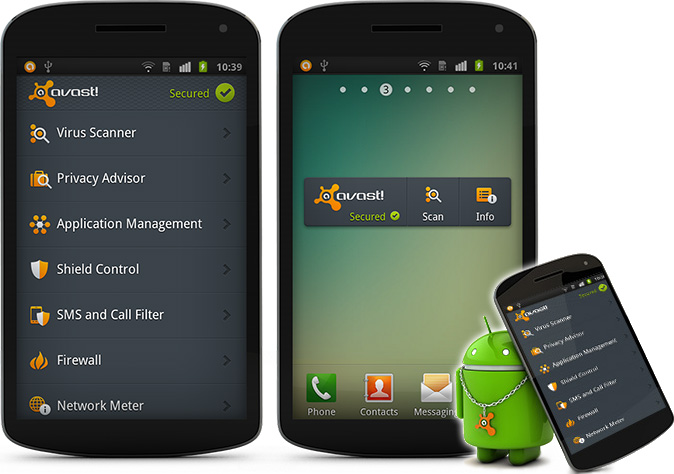
Avast Premium Mobile security

프로모션.
http://www.avast.com/mobile#contest

참여방법

  • Follow @avast_antivirus.
  • Retweet this Tweet to your followers.
  • The first 1000 people to follow and RT will receive a 1-year license of avast! Premium Mobile Security.
  • Voucher codes will be distributed from @avast_antiviruswithin 10 days via Direct Message.


Celebrate with us
100 million downloads

of our Mobile Security 
& Antivirus Android package


Total Defense Anti-Virus Plus Anti-Spyware - 6 months

프로모션.
http://store.totaldefense.com/ca/landingpages/2011/other/mediacom/antivirus/index.asp


Total Defense AntiVirus


Total Defense

AntiVirus

Comprehensive Virus and Spyware Protection for 3 Devices

Total Defense offers professional-grade antivirus and anti-spyware protection for home and home office users. The comprehensive solution offers integrated virus and spyware combating capabilities, guarding your PC from worms, Trojans, FakeAV and other malware that can slow down or even damage your PC. And you can set your security settings in a snap with the intuitive interface.

Total Defense Anti-Virus offers comprehensive professional-grade security to home and home office PC users. This easy-to-use security solution features one of the world’s fastest scanning engines and protects against viruses, worms, spyware, FakeAV, and other online threats. Designed specifically for home and home office environments, Total Defense AV introduces some industry-leading anti-malware enhancements and automatic USB scanning technologies. It packs unprecedented power into an even smaller memory footprint, making your PC security leaner, meaner and smarter than ever before.
The new release offers increased detection of malware with cloud-based scanning, and automatic scanning of all downloads, ensuring infected files are quarantined before they can cause harm. And Total Defense Anti-Virus is auto-upgradeable, which means you don’t have to check for product upgrades and go through cumbersome steps to step up your security. It all happens seamlessly, keeping your system fighting fit against the latest malware challenges.
In addition to its fast scanning engine and smart malware detection capabilities, Total Defense Anti-Virus includes automatic updates, intuitive wizards, and well-thought-out default settings to eliminate the need for you to baby-sit your security software and second-guess protection levels. Total Defense Anti-Virus is all about top-notch security made easy. Sso you can browse, email, send files, and chat online securely and keep your PC running at top condition.
Total Defense Anti-Virus Key Features:
  • New! Cloud Defense Scanner
  • New! Download Defender
  • Real-Time Virus & Spyware Protection
  • Fast Scanning
  • Continuous Updates
  • Automatic USB Scanning
  • Informative Reports
  • New! Cloud Defense Scanner

    Increased detection of malware with cloud-based scanning, enabling checks against a significantly larger database of malware. Cloud scanning delivers a higher level of protection by having the pattern of your files compared against a trusted whitelist of known good files online.
  • New! Download Defender

    Automatically scans all downloads ensuring infected files are quarantined before they can cause harm.
  • Anti-Virus & Anti-Spyware

    Prevents viruses, worms, rootkits, and Trojan horses from infecting your PC and protects you from existing and new spyware threats.
  • Continuous Updates

    Keeps your PC protected against the latest threats by downloading malware signatures and feature updates. There’s no need to upgrade to a newer version of the program either; your protection is upgraded to the latest release as long as you have an active subscription. It’s seamless, automatic, and simple.
  • Informative Reports

    Lets you monitor the status of your system by providing real-time reports that show user activity and system alerts.
  • Intuitive Help Desk

    Gives you Fast Facts, Custom Ssupport, and a Help Key that provides you with easy-to-understand information when you need it.