http://www.bitsdujour.com/software/minitool-power-data-recovery/in=today-100-percent
Uh oh! That critically important file, the one that you keep in that special folder away from all of your other stuff, has managed to disappear! Accidental deletion? Intentional sabotage? Dog with opposable thumbs? No matter what the cause, there’s no need to panic if you have a copy of today’s discount software promotion, MiniTool Power Data Recovery!
MiniTool Power Data Recovery lets anyone, regardless of technical expertise, recover lost data from deletions and damaged/formatted hard drives. With MiniTool Power Data Recovery, you’ll be able to easily rescue deleted data not only from hard disks and RAID devices, but also CDs, DVDs, memory cards, flash drives, and memory sticks
![[IMG]](http://download.bitsdujour.com/software/screenshot/minitool-power-data-recovery-vsidf.png)
Undelete Recovery module works only with deleted files and allows user to "undelete" them (another popular term is "unerase"). This data recovery module focuses on recovering deleted files and folders. By using Undelete Recovery module, you could recover deleted files emptied from the Windows Recycle Bin and even files deleted by using SHIFT+DELETE key.
Undelete Recovery module supports FAT12, FAT16, FAT32, VFAT, NTFS and NTFS file systems. And it supports hard disk, flash drive, memory stick, memory card and flash card.
a.) To recover files from an inaccessible folder, please use Damaged Partition Recovery module.
b.) To recover deleted files from CD/DVD disks, please use CD/DVD Recovery module.
c.) If Undelete Recovery module cannot find out your lost/deleted files, please try Damaged Partition Recovery module.
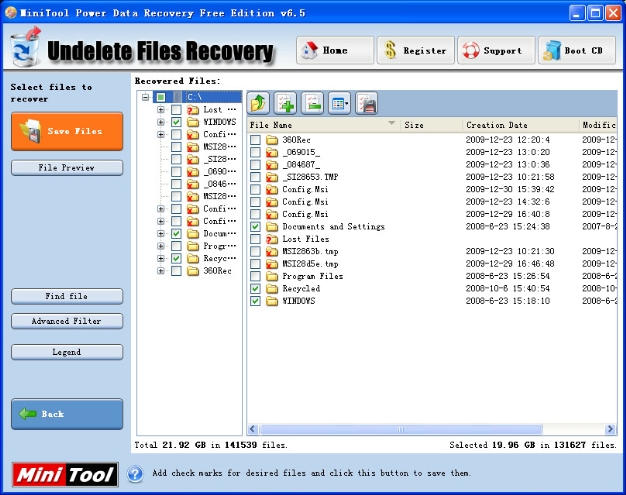
(Screen shot of Undelete Recovery module)
![[IMG]](http://cdn.comss.net/img/2014-12-21_121905.png)







![[IMG]](http://cdn.comss.net/img/2015-03-11_12433.png)
![[IMG]](http://cdn.comss.net/img/2015-03-11_120048.png)
![[IMG]](http://cdn.comss.net/img/2015-03-11_130254.png)